The National Education Society for Tribal Students (NESTS) has officially announced the recruitment update candidates have been waiting for. The EMRS Tier 2 Result 2026 was officially made public on September 7, 2026. This initial release covers key positions including PGT Computer Science, Junior Secretariat Assistant (JSA), and Principal posts, paving the way for qualified aspirants to transition into the subsequent phases of the selection process.
Following the ESSE 2025 Tier-II examination conducted successfully on March 22, 23, 24, and 25, 2026, candidates can now view their performance via a detailed scorecard format on the official web portals.
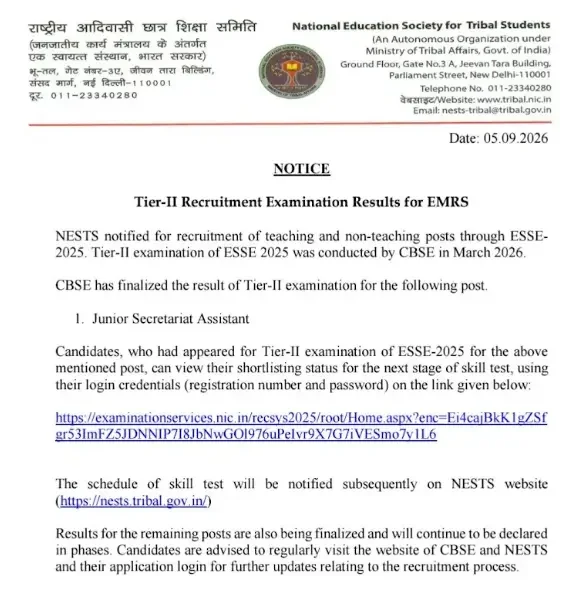
EMRS Tier 2 Result 2026 Overview
To help candidates understand the status of their examination and upcoming milestones, key information regarding the announcement is summarized below:
| Particulars | Details |
|---|---|
| Mode of Result | Online (Scorecard Format) |
| Result Release Date | September 7, 2026 (for PGT Computer Science) |
| Exam Date | 22nd, 23rd, 24th, and 25th March 2026 |
| Mode of Result | Online |
| Login Credentials | Registration No and Password |
| What Next Stage | Interview (for Principal and senior posts) Document Verification (Other Posts) |
You can directly check your standings, evaluate your performance, and compare cut-offs using resources such as the EMRS Tier 2 Result 2026 Link (Active) - Click to Check and review metrics via Click to Check EMRS Tier 2 Cut-Off Marks for All Posts.
How to Check EMRS Result 2026
Follow these procedural instructions carefully to access your scorecard:
- Go to the official website of the National Education Society for Tribal Students (NESTS): https://nests.tribal.gov.in/.
- Click on the Recruitment tab on the top bar of the homepage.
- Click on the link titled 'Result of Tier-II examination (marks and selection status for Tier-II examination) of teaching and non-teaching staff'.
- Redirect to the candidate login page.
- Enter Registration Number and Password.
- Fill in the captcha code and click on the Login tab.
- View and download the EMRS Result and Score Card.
Details Mentioned in EMRS Principal Result
Once downloaded, examine your scorecard to ensure all credentials and personal details are accurately stated:
- Examination name
- Post name
- Candidate roll number
- Candidate name
- Category
- Qualification/shortlisting status
- Instructions for the next stage
- Important dates
- Reporting/document requirements
Selection Process Stages
Qualifying the Tier-II examination opens up the subsequent evaluation steps:
- Tier 2 Exam / Skill Test
- Interview
- Document Verification (DV)
- Medical Test
- Final Merit List and Appointment
Candidates who successfully clear this phase will proceed to Interviews (for Principal and senior posts) or Document Verification (for other posts). Make sure to prepare your files and stay updated via official communication channels like https://emrs.tribal.gov.in/.
Frequently Asked Questions (FAQs)
Recommended Reads
- EMRS Tier 2 Result 2026: Check Release Date, Cut-Offs, and Next Selection Stages
- EMRS Tier 2 Admit Card 2026 Out – Download Hall Ticket & Exam Schedule
- EMRS Hostel Warden Salary 2026: Pay Scale, In-Hand Pay & Allowances
- EMRS TGT Syllabus 2026 & Exam Pattern: Your Comprehensive Guide
- EMRS Tier 1 2026 OMR Sheet Re-calculation Notice Out: Apply by 7th March
- EMRS Final Answer Key 2026 Released by NESTS: Download PDF
Negative Marking & Net Score Calculator
Calculate your exact post-answer-key net marks after deducting 1/3rd or 1/4th negative penalty across SSC, UPSC, and State exams.
Never miss another exam update!
Get the fastest exam results, recruitment news, and educational guides delivered directly to your phone.