The announcement of the RPF SI Final Result 2025 marks the successful culmination of a rigorous recruitment drive conducted by the Railway Recruitment Board (RRB). Officially released on August 26, 2025, this outcome determines the final appointment of qualified candidates for Sub-Inspector vacancies under CEN 01/2024. Out of a massive pool of over 1.5 million initial applicants, only a select group progressed through the grueling evaluation phases, demonstrating exceptional dedication and capability.
Overview of RPF SI Recruitment 2025
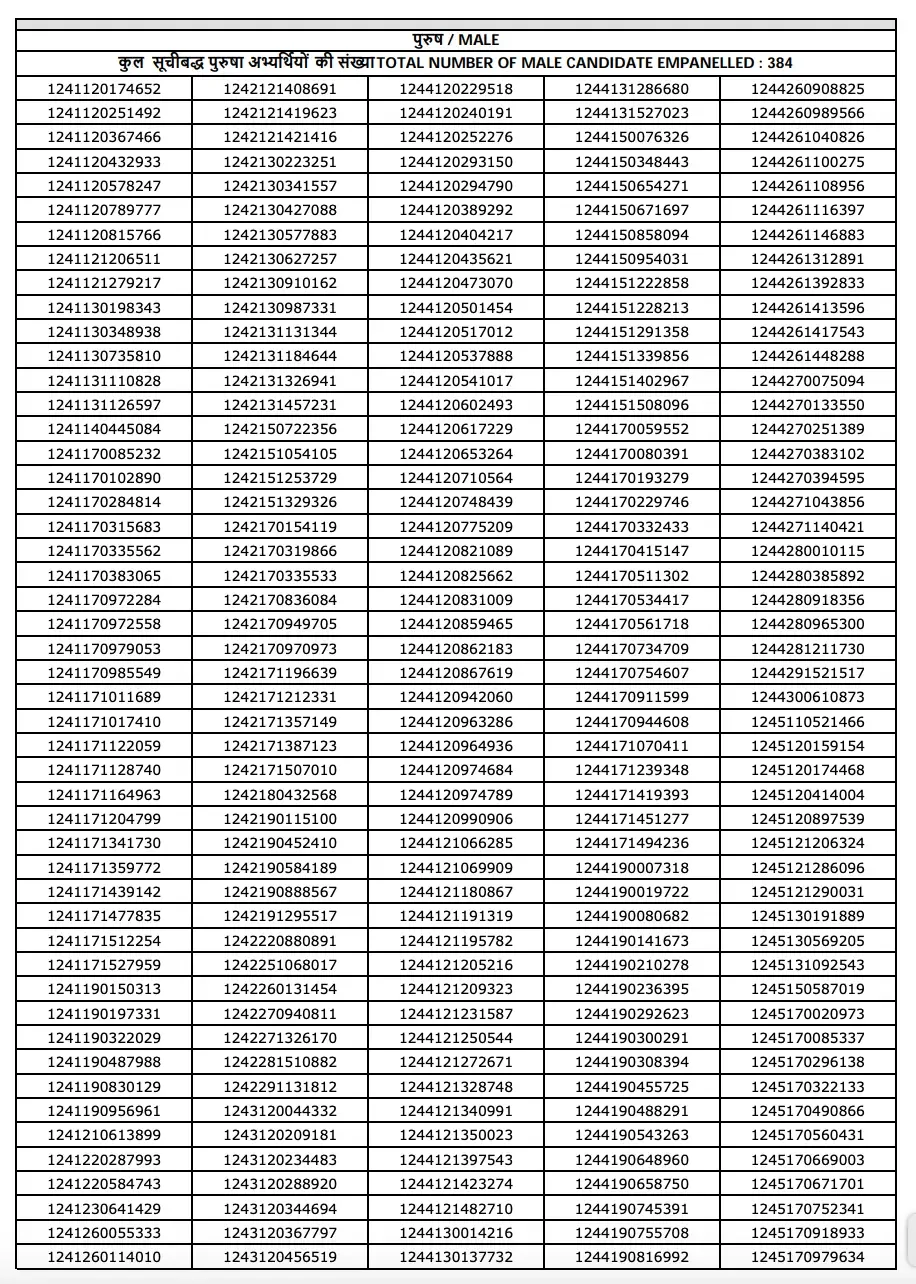
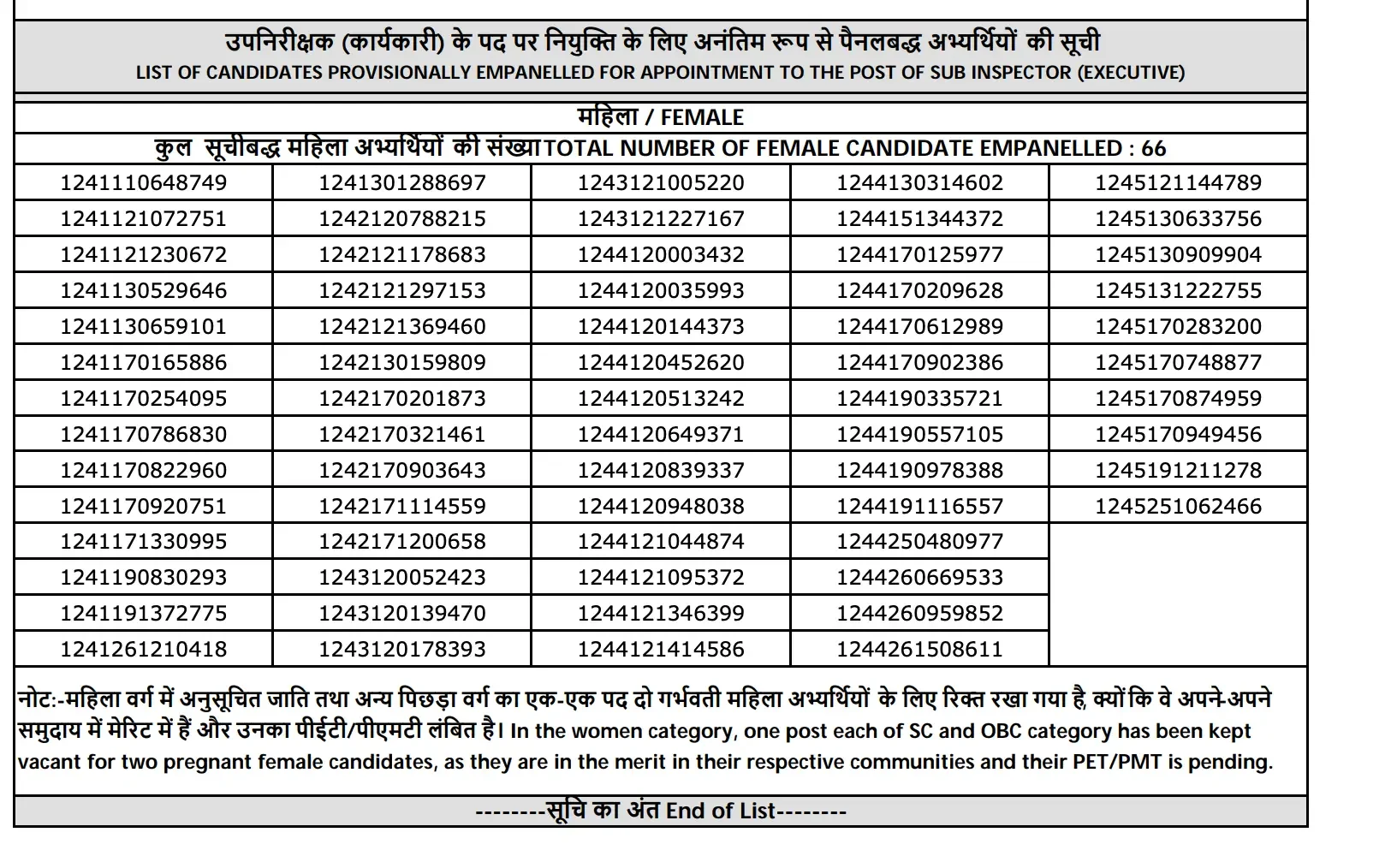
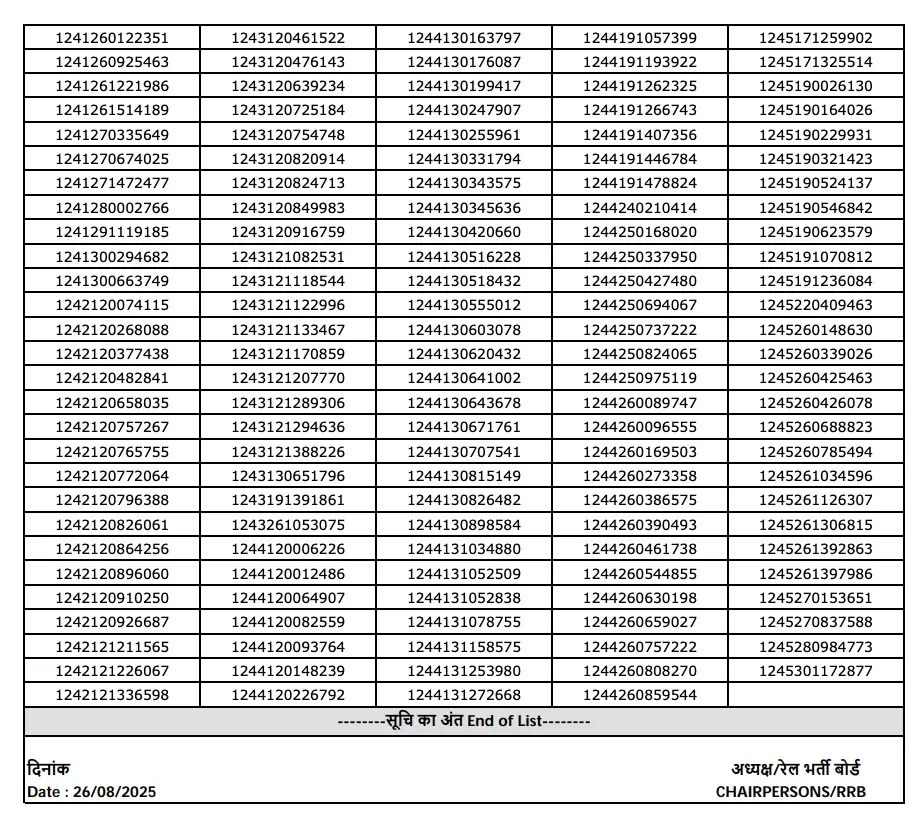
The Railway Recruitment Board (RRB) concluded all selection phases for exactly 450 Sub-Inspector vacancies under the centralized employment notification CEN 01/2024. Following competitive examinations and physical screenings, 4,527 candidates qualified for the physical stages, narrowing down to the final merit list. Among the 450 selected candidates who successfully secured their place, 384 are male and 66 are female.
Selection Procedure Breakdown
The pathway to final appointment required candidates to clear multiple intensive stages designed to test both academic knowledge and physical endurance. The comprehensive selection criteria included:
- Computer-Based Test (CBT)
- Physical Efficiency Test (PET)
- Physical Measurement Test (PMT)
- Document Verification
How to Check RPF SI Result 2025
Candidates looking forward to verifying their qualification status can follow the structured steps outlined below:
- Visit the official RPF website or the specific Railway Recruitment Board (RRB) website related to the zone you applied for.
- Look for a section on the website dedicated to recruitment or results, labelled "Recruitment," "Results," or "Latest Announcements."
- Look for the notification related to the exam or recruitment for which you appeared.
- Download the result PDF, containing the roll numbers of selected candidates, and check for your roll number.
- Follow further instructions; appointment letters will be shared shortly if you have qualified.
You can directly access the portal to check RPF SI Result 2025 and final cut-off marks via https://www.rrbcdg.gov.in/. Additionally, you can Check Official RPF SI Final Cut Off 2025 for category-specific breakdowns. For direct documentation, you can download the Download RPF SI Final Result 2025 PDF.
Next Steps for Qualified Candidates
If your roll number appears in the official final selection list, ensure you keep your identification and verification documents ready. Official appointment letters and reporting guidelines will be shared shortly by the Railway Protection Force (www.rpf.indianrailways.gov.in). Make sure to monitor your designated portal regularly for forthcoming instructions concerning medical examinations and joining procedures.
Frequently Asked Questions (FAQs)
Recommended Reads
- RPF Recruitment 2025: New Rules, SSC Authority, and Eligibility Changes
- RPF Constable Salary 2025: Pay Scale, Allowances, and Career Growth Under 7th CPC
- RPF Admit Card 2025 Out: Download Constable Hall Ticket & CBT Exam Schedule
- RPF Constable Exam Schedule 2025: CBT Dates, Shifts & Vacancy Details
- RPF SI Exam Date 2024 Schedule, Admit Card & CBT Details
- RPF Constable Physical Test 2025: Schedule, Admit Card & Preparation Guide
Negative Marking & Net Score Calculator
Calculate your exact post-answer-key net marks after deducting 1/3rd or 1/4th negative penalty across SSC, UPSC, and State exams.
Never miss another exam update!
Get the fastest exam results, recruitment news, and educational guides delivered directly to your phone.